Franchise website development is building the website setup your franchise network runs on. Networks set this up in different ways. Some run one central website and online store, with a page for each location and online orders sent to the store that fills them. Others give each franchisee a microsite or a separate website built from the brand template.
The right setup depends on three things: how much control head office keeps, what franchisees need to change locally, and whether locations sell online. This guide covers the four common setups, when each one fits, the features a franchise website needs, and the tools you can build it with.

Which franchise website setup fits your network?
Most franchise networks use one of four setups, or a mix of them. They differ in who edits the website, where each location's pages live, and how much each location can change.
| Setup | How it works | Who edits | Fits networks where |
|---|---|---|---|
| One central website with store pages | One website on your domain, with a page for each location built from one template. Online sales run through one central store. | Head office | Head office runs marketing and online sales, and locations differ mainly by address, opening hours and stock. |
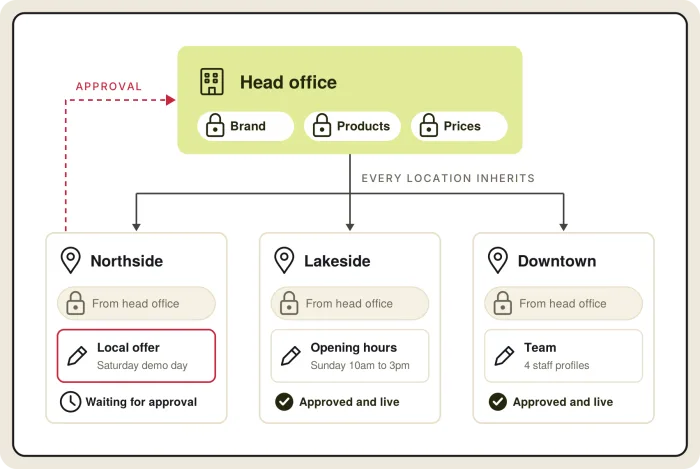
| Central website with franchisee-edited location pages | The same single website. Franchisees edit set fields on their own location page, such as opening hours, local offers, events and photos. | Head office, and franchisees within the fields head office opens, with approval | Locations run local promotions or events and need to update them quickly. |
| Microsites for each location | Each location gets a few pages of its own, on a subfolder or subdomain of your domain, built from a shared template. | Franchisees within the template, with head office running the shared pages | Locations offer different services, take their own bookings, or need more local content than one page holds. |
| Separate franchisee websites | Each franchisee runs a full website, often on its own domain. On a shared platform, head office still controls the brand template and shared content. | Franchisees, within the brand rules head office sets | Franchisees run as independent businesses, sell different products or services, or joined the network with websites of their own. |
Your franchise agreement usually decides which of these you can use. In the US, the franchise disclosure document (FDD) often states whether franchisees may run their own websites or must use the brand's.
How each setup affects search
Store pages and microsites on your main domain all add to one website's search presence. Separate domains each have to build their own, and pages on different franchisee websites can compete for the same searches. If franchisees need separate websites, give each one a clear local focus, such as its suburb or city.
Examples: Clark Rubber and Direct Chemist Outlet
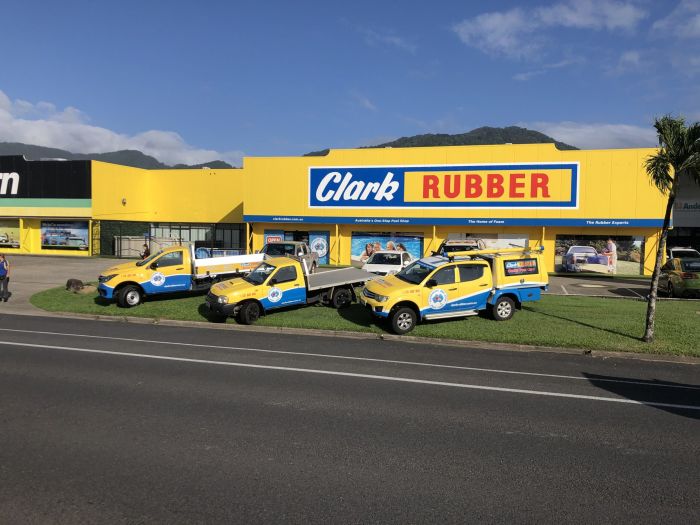
Clark Rubber uses the first setup. Head office runs one website and online store for more than 60 franchise stores, with a page for each store built from one template. Delivery orders go to the closest store that can fill the whole cart, Click & Collect orders go to the store the customer picks, and each sale is credited to the franchisee whose store fills it. Read how Clark Rubber manages stock across 60+ franchise stores.
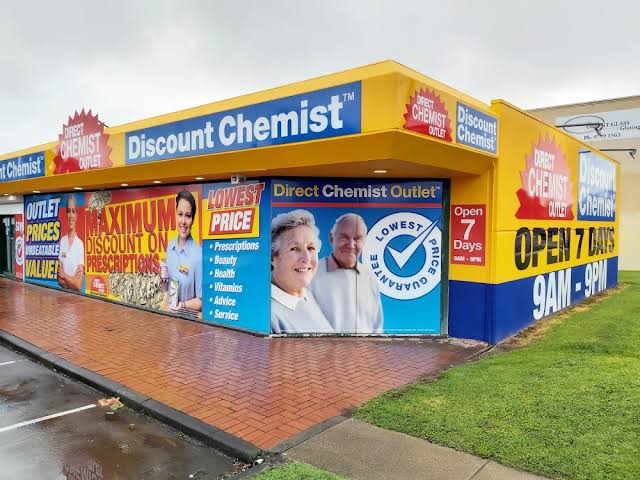
Direct Chemist Outlet, a network of more than 150 franchised pharmacies, is moving to the same setup on our platform. Consumers and business customers shop on one website, and each pharmacy's stock comes from the group's point of sale system. Delivery orders go to a pharmacy by state, then by stock and distance, and each pharmacy works through its Click & Collect, delivery and backorder orders in one store portal. Every order is attributed to the pharmacy that fills it, so head office can pay each store for the orders it fulfilled. Read the Direct Chemist Outlet story.
Mixing and changing setups
Many networks mix setups. A central website with store pages can add microsites for the few locations that offer extra services. A network that grows through acquisitions often starts with separate franchisee websites and moves them onto one platform later, redirecting each old site to its new location page. If your platform can run more than one setup, these changes don't need a rebuild.
What features does a franchise website need?
Five features belong on every franchise website, whatever the setup.
Brand templates
Head office sets the design system once: logo, colors, typography, navigation, page layouts, calls to action and forms. Location pages, microsites and franchisee websites are all built from it, so a brand change made at head office reaches every location. Look for a platform where template changes can be previewed before they go live and rolled back afterwards.
Location pages and a store locator
Keep one record for each location with its name, address, phone, opening hours, services and coordinates. That record fills the location's page and the store locator, where customers can search by distance and filter by service or opening hours.
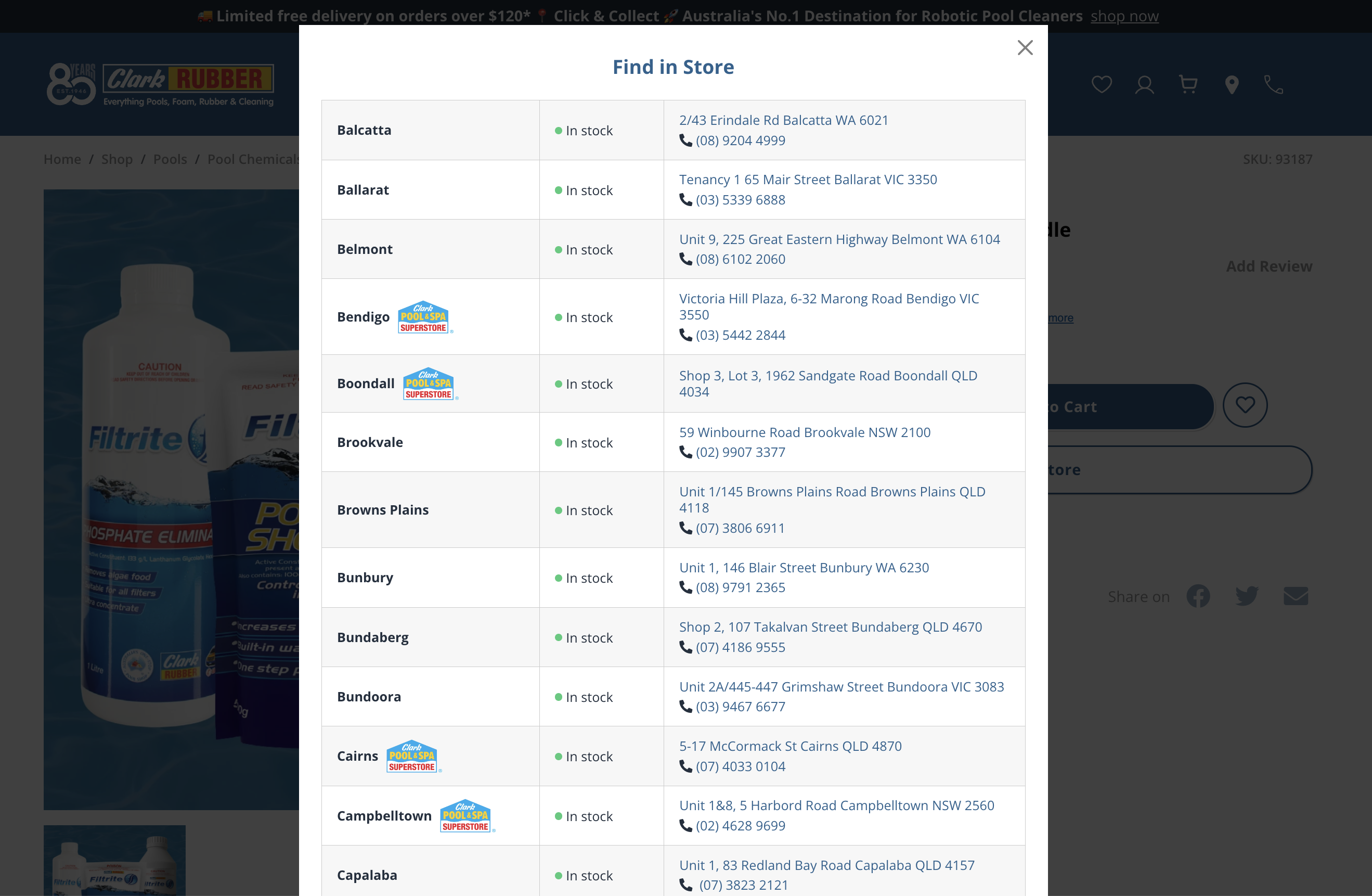
If you sell online, the store locator can also show stock by store. At Clark Rubber, every product page has a Find in Store view that lists each store, whether the product is in stock there, and the store's address and phone number.
Each location page needs:
- Address, map, opening hours and directions
- A contact, booking or inquiry form that goes to that location
- Local offers, events, photos and the local team
- Store markup with the address, coordinates and opening hours, so search engines and AI assistants read every location the same way
- If the location sells online, delivery or Click & Collect from that store
Most networks also use a listings tool, such as Yext or Uberall, to manage Google Business Profile listings and reviews. Point each listing to the location's page on your website.
Forms and analytics by location
Use one set of forms and one analytics setup across every location. Send each inquiry or booking to the location it's for, and tag every page with its location, so head office can compare locations and each franchisee can see their own results.
Speed and accessibility
Every location page built from a template shares that template's speed, mobile layout and accessibility. Fix Core Web Vitals and accessibility to WCAG 2.2 AA, the standard US businesses usually follow for ADA compliance, once in the template, and every location page inherits the fix.
Integrations
List the systems the website needs to connect to before you choose a platform: point of sale, ERP, stock, bookings, CRM, payments and franchise management software. Ask each vendor which of these connect out of the box and which need custom work.
Features to add when your network needs them
These features depend on how your network sells and who it sells to.
Franchise recruitment pages
Most franchisors run a site or section to recruit new franchisees, with the opportunity, investment levels, available territories and an inquiry form that goes to the franchise sales team. It can live on its own domain or as a section of the brand website, and on the same platform it shares the brand template.
Franchisee access with approvals
In every setup except one central website, franchisees edit part of the site. Give each franchisee access to their own location only, open only the fields they need, and send their changes to head office for approval before they go live. Keep a record of who changed what and when.
Online store with stock and orders by location
If locations sell online, the website needs stock by store, rules that send each order to the store that can fill it, and a way to credit each sale to the franchisee whose store fills it. Clark Rubber runs this for more than 60 franchise stores.
Store team portal
When stores fulfill online orders, each store needs one place to work through them: Click & Collect, delivery and backorders, shipping labels, refunds and returns. Head office needs a view across every store. Direct Chemist Outlet is building this for its 150+ pharmacies, to replace a mix of order screens, spreadsheets and email.
B2B portal for trade and business customers
Many franchise networks also sell to businesses, schools and trades. Business customers need their own accounts with credit terms, invoices, order history and quick reordering, and in a franchise network each business account usually belongs to the store that serves it. At Clark Rubber, business customers register on the same website as households, each business account is assigned to its closest store, and credit limits and balances come from the ERP. Some franchisors also use a B2B portal for franchisees to order stock and supplies from head office. See how trade accounts work on our B2B ecommerce platform.
AI assistants that update the website, with approvals
Many updates across a franchise network are the same change repeated location by location: holiday opening hours, a new banner, an offer for one region. An AI assistant connected to the website can make those changes from a plain-language request. Look for one that works inside each user's permissions, saves its changes as drafts for approval, and records every change so it can be rolled back.
On our platform, Claude, ChatGPT or another assistant connects through an MCP server. It works inside the role and permissions of the person signed in, and can be limited to read-only. Its changes are saved as unpublished revisions for head office, or each location, to approve, and every request is logged. It stays off until your account manager switches it on. Save a Life, a training provider, used it to translate about 1,700 pages, with a medical advisor approving every page. See how AI agents work with permissions and approvals.
See how the website, location pages, online store and store portal run together on our franchise website platform.
Franchise website builder, platform or agency?
Each type of tool covers a different part of what a franchise network needs. The table shows what each one covers.
| What you need | Location page tools (Yext Pages, Uberall) | Franchise website builders (DevHub) | WordPress Multisite | Core dna |
|---|---|---|---|---|
| Main website and brand templates | Sits alongside your main website | Franchise and location sites from brand templates | Yes | Yes |
| Location pages with store markup | Yes | Yes | With plugins or custom templates | Yes, from one template |
| Store locator | Yes | Yes | With plugins | Yes, with stock by store for each product |
| Franchisee access | To location data | Local editing within brand templates | User roles built in, approvals through plugins | By location, with approvals and revision history |
| Microsites or separate franchisee websites | Mainly location pages | Yes | Yes, a site per location | Yes, all on one platform |
| Online store with stock and orders by location | Not included | Through integrations | WooCommerce, with custom development for stock and orders by location | Built in: stock by store, each order sent to the right store, and the sale credited to the franchisee |
| Store team portal for online orders | Not included | Not listed | Plugins or custom development | Built in: order queues for each store, and a head office view across every store |
| B2B portal for trade customers | Not included | Not listed | WooCommerce B2B plugins | Built in: business accounts with credit terms, quotes and invoices, each linked to a store |
| AI assistants that update the site, with approvals | AI for listings, reviews and location content | Not listed | MCP Adapter plugin, working within WordPress user roles | Built in: Claude or ChatGPT through MCP, inside each user's permissions, with changes saved as drafts for approval |
| Updates and security | Handled by the vendor | Handled by the vendor | You or your agency, on every site | Handled for you on a hosted platform |
If you already run a website and only need location pages and a store locator, a location page tool is the quickest addition. Yext and Uberall are also listings tools, and many networks keep one for Google Business Profile listings and reviews, whatever website they run. If you sell online, need franchisee access with approvals, or run more than one setup, look for a platform that runs the website, location pages and online store together.
Enterprise CMS platforms such as Drupal, often hosted on Acquia, and Adobe Experience Manager can also run these setups, usually through an agency build, with ecommerce from a separate product. Website builders such as Wix or Squarespace suit a single location, and aren't built to manage templates, permissions and location data across a network.
An agency can build on any of these. Before you sign, ask each vendor or agency what it costs and how long it takes to add a location, and who maintains the websites after launch.

Franchise website development is building the website setup a franchise network runs on. That covers the brand template, a page, microsite or website for each location, the access each franchisee has, and the integrations with stock, orders, bookings and point of sale. Common setups range from one central website with a page for each store to separate franchisee websites built from one brand template.
Every franchise website needs brand templates, a page for each location with a store locator, forms and analytics that work by location, and fast, mobile-friendly, accessible pages. Depending on how your network runs, it may also need franchise recruitment pages, franchisee access with approvals, an online store with stock and orders by location, a portal where store teams manage online orders, and a B2B portal for trade and business customers.
Give franchisees their own websites when they run as independent businesses, sell different products or services, or joined the network with websites of their own. Otherwise, a page or microsite for each location on your main website is simpler to run: one brand, one domain building search presence, and one set of templates to maintain. If franchisees do need their own websites, build them from one brand template on one platform, so head office can still update the brand and shared content across every site.
Yes, if the platform supports permissions by location. Head office keeps the brand, templates, products and prices, and opens only the fields each franchisee needs, such as opening hours, local offers, events and photos. Franchisee changes go to head office for approval before they go live, and every change is recorded with who made it and when.
It depends on the setup, the number of locations and the integrations the website needs. Location page tools and franchise website builders often charge per location per month. Platforms and custom builds usually charge a license or subscription plus a one-off build. Ask each vendor what the website costs at your current number of locations and at double that number, what it costs to add one location, and what ongoing maintenance includes.
Most franchise networks go live in 6 to 10 weeks, and the people who build the platform run the implementation.
- Week 1: we map your locations, catalog, store data and who edits what.
- Weeks 2 to 5: your templates, the location page template, head office and franchisee permissions, and the catalog and stock feeds.
- Weeks 6 and 7: content is migrated and mapped, redirects are set up, and each location's team is onboarded.
- Weeks 8 to 10: launch, with your implementation lead on standby.
After launch the same team stays on, with a dedicated success manager and quarterly business reviews.
Summarize with